Text Options Window
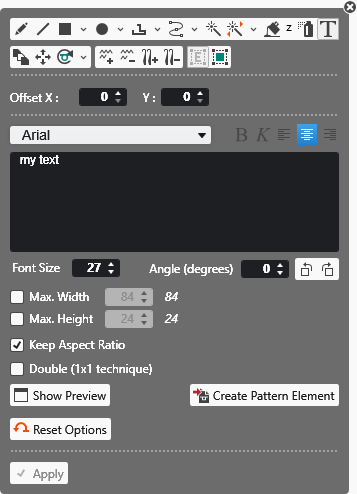
|
Offset X |
Draw the text by dot line.
|
|
Offset Y |
Draw the text by dot line.
|
|
Character Format |
Format the text. |
|
Edit Box |
Enter and view a text. |
|
Dimensioni del carattere |
Enter the font size. |
|
Angolo (gradi) |
Rotate the text by the specified angle. |
|
Larghezza massima |
Enter the maximum width of the text. |
|
Altezza massima |
Enter the maximum height of the text. |
|
|
Keep the aspect ratio when drawing the text. |
|
|
The text is entered with double width. |
|
Mostra anteprima |
Shows a thumbnail of the text according to specified settings. |
|
Crea parte di disegno |
Creates a pattern element with the text and saves it to the Pattern Element tool window.
|
|
|
Ripristina comportamento standard dello strumento di disegno corrente. |
|
|
Applica dati dall'eco dei caratteri nel disegno Only active with |

 double-click on
 Cursor attributes selected together with the text are applied to the pattern element.

