Racking Value
|
|
Make settings for the racking value. |

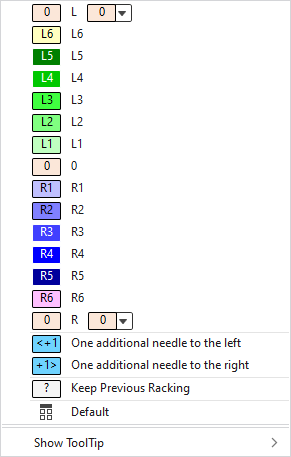
In the context menu on the control column of a pattern you have the following options:
|
|
Select the desired racking value to the left. |
|
|
Select the racking value from L6 to R6. |
|
|
Select the desired racking value to the right. |
|
|
Move the racking additionally one needle to the left. |
|
|
Move the racking additionally one needle to the right. |
|
|
Keep the previous racking. |
|
|
Sets the setting on Impostazione predefinita.
|
|
|
Deletes the entry. |
|
Mostra descrizione comandi |
 L
L 
 to
to 


 Applies the entry of the default setting from the header row.

In the context menu on the control column of a module you additionally have the following options:
|
|
Maximum racking to the left The value is converted into an absolute racking value corresponding to the allowed racking value of the actual machine when inserting the module. |
|
|
Maximum racking to the right. The value is converted into an absolute racking value corresponding to the allowed racking value of the actual machine when inserting the module. |

