Protection Rows
Ranghi di protezione Section
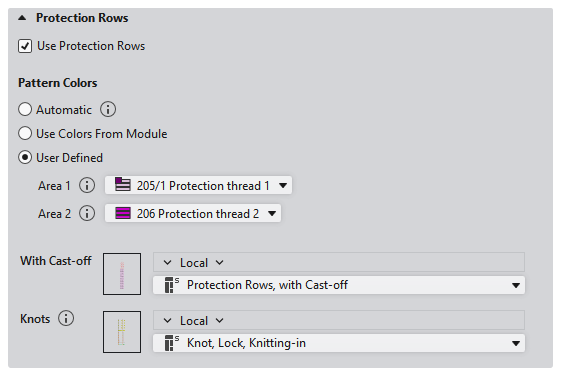
|
|
Use protection rows. | |
|
Colori del disegno |
Options for the pattern color of protection rows. | |
|
|
|
Utilizzare il colore del disegno del ultimo rango lavorato. |
|
|
The pattern color of the module is used in the protection rows.
| |
|
|
Select the colors for the areas of protection rows. | |
|
Zona 1 |
Colore del filato in ranghi di protezione: Predefinito i per la zona a destra dell'apertura This setting is only used in one area. If the selection is set to automatic, the basic color or the color of the last pattern row is applied. | |
|
Zona 2 |
Colore del filato in ranghi di protezione per la zona a sinistra dell'apertura When two areas are knitted at the fabric end, Area 1 is applied on the right and Area 2 is applied on the left. For example with fully fashioned fabric with collar opening. | |
|
Senza scarico |
If a machine without comb or with a switched off comb is selected, the selection Senza scarico appears. Select the module for the protection rows at fabric end. The modules from the Moduli tecnica / Teli speciali / Ranghi di protezione, Senza scarico module group are available.
| |
|
Con scarico |
If a machine with an active comb is selected, the selection Con scarico appears. Select the module for the protection rows at fabric end. The modules from the Moduli tecnica / Teli speciali / Ranghi protetti, Con scarico module group are available.
| |
|
Nodo |
Select the module for the knot of the protection row thread. The modules from the Moduli tecnica / Intarsio, Immagliatura/Fine lavorazione / Nodo all'inizio module group are available.
| |


