Context Menu on the Search Area of CA
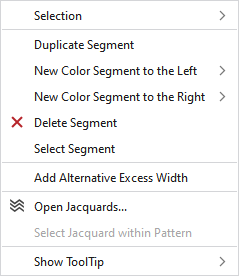
Make the following settings in the context menu of the search area:
|
Selezione |
Select |
The functions of the menu bar Selezione are also available in the context menu. |
|
Protezione |
A selection can be protected from interventions. | |
|
Duplica segmento |
Duplicates the segment at the cursor position. | |
|
Nuovo segmento colore a sinistra |
Adds a new color segment to the left of the cursor position.
| |
|
Nuovo segmento colore a destra |
Adds a new color segment to the right of the cursor position.
| |
|
|
Deletes the segment at the cursor position. | |
|
Seleziona segmento |
Selects the segment at the cursor position. | |
|
Aggiungi sovralarghezza alternativa |
Adds a row in the search area where you specify the settings for the alternative excess width. | |
|
Rimuovi sovralarghezza alternativa |
Removes the row for alternative excess width from the search area. | |
|
|
Opens the tool window Jacquard and shows in it the Jacquard of the cursor position. | |
|
Seleziona Jacquard nel disegno |
Selects the Jacquard in the pattern. | |
|
Mostra descrizione comandi |
|
Activates the tooltip in the needle area. |
|
|
Activates the tooltip in the control columns. | |
|
|
The coordinates of the drawing are shown when drawing. | |


