Quick Access Toolbar (MC Jacquard Editor)
In the quick access toolbar you have access at any time to the following commands:

Using the drop-down menu you can display and hide the commands in the quick access toolbar and make settings.
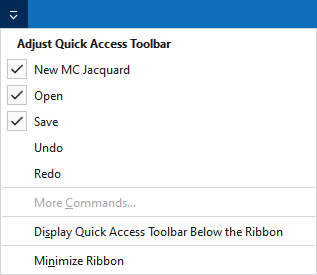
Personalizza barra di accesso rapido
The following commands can be displayed and hidden in the quick access toolbar:
|
|
Crea nuovo MC jacquard (*.jac). |
|
|
Apre la finestra di dialogo 'Apri file'. |
|
|
Salva |
|
|
Annulla l'operazione precedente. |
|
|
Ripete l'operazione precedente. |


Make settings for the quick access toolbar and the ribbon:
|
Mostra barra di accesso rapido sotto la barra multifunzione |
Display the quick access toolbar under or above the ribbon. |
|
Riduci barra multifunzione |
Show or hide the ribbon. |