Context menu of the pattern layer
Make the following settings in the context menu of the pattern layer:
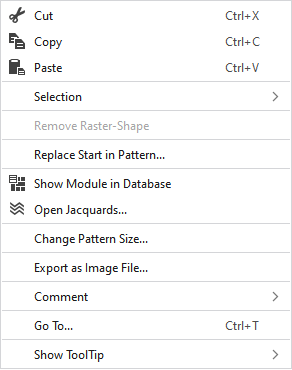
|
|
Elimina il contenuto della selezione e lo copia negli appunti. | |
|
|
Copia il contenuto della selezione negli appunti e lo applica al cursore (attributi del cursore). | |
|
|
Applica il contenuto degli appunti al cursore (attributi del cursore). | |
|
Selezione |
Crea Jacquard... |
I. Generate a Jacquard area in the selected area. |
|
|
Create a pattern element from the selection. Crea dalla selezione esistente una nuova parte di disegno e l'aggiunge alla finestra degli strumenti 'Parti di disegno'. | |
|
Select |
The functions of the menu bar Selezione are also available in the context menu. | |
|
Protezione |
A selection can be protected from interventions. | |
|
Rimuovi forma a griglia |
If a .spf pattern with raster-shape is imported, this function can be used to remove the raster-shape from the pattern.
| |
|
Sostituisci inizio nel disegno… |
Per selezionare l'inizio desiderato richiamare la finestra di dialogo Sostituisci inizio. | |
|
|
Shows the module at the cursor position in the database. | |
|
|
Opens the tool window Jacquard and shows in it the Jacquard of the cursor position. | |
|
Modifica dimensioni del disegno... |
Opens the dialog box where you can change the height and width of the pattern. | |
|
Esporta come file di immagine... |
Save the design view off the whole pattern as image file. | |
|
Commento |
Place a pin, comment, or graphic anywhere in the pattern. | |
|
Vai a... |
Opens the Vai a dialog box. | |
|
Mostra descrizione comandi |
Make settings for the tooltip. | |


 You cannot edit a raster-shape in
