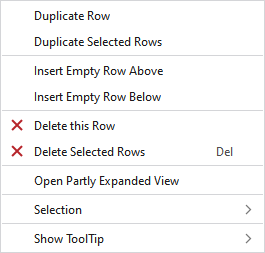
Context menu of the control column of the pattern rows
In the context menu on these control columns you have the following options:
|
Duplica ranghi |
Duplicated the row under the cursor. | |
|
Duplica ranghi selezionati |
Duplicates the selected rows. | |
|
Inserisci sopra ranghi vuoti |
Enters an empty row above the clicked row. | |
|
Inserisci sotto ranghi vuoti |
Enters a row under the clicked row. | |
|
|
Deletes the row at the cursor position. | |
|
|
Deletes all the selected rows. | |
|
Selezione |
Crea Jacquard... |
I. Generate a Jacquard area in the selected area.
|
|
|
Create a pattern element from the selection. Crea dalla selezione esistente una nuova parte di disegno e l'aggiunge alla finestra degli strumenti 'Parti di disegno'. | |
|
Select |
The functions of the menu bar Selezione are also available in the context menu. | |
|
Protezione |
A selection can be protected from interventions. | |
|
Mostra descrizione comandi
| ||


