|
|
|
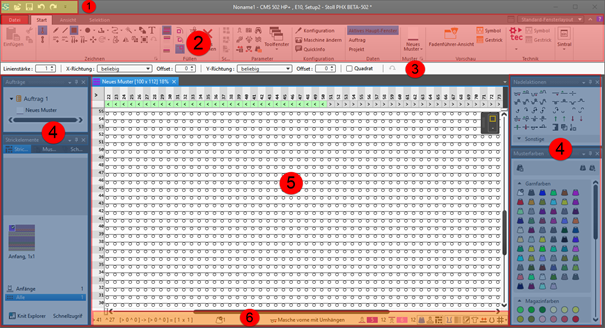
1
|
Quick Access Toolbar
|
Adjusting via the  selection list selection list
|
|
2
|
Ribbons
|
Ribbons containing the necessary groups for editing
-
Arquivo
-
Início
-
Vista
-
Seleção
 : The ribbon can be minimized. : The ribbon can be minimized.
|
|
3
|
Properties of Drawing Tools
|
Adjusts to the selected drawing tool
|
|
4
|
Tool Windows
|
Selection of the corresponding tool windows by  in the ribbon in the ribbon
: You can move the tool windows by the Left Mouse Button and dock them to the edges of the main window or position them floating freely.
|
|
5
|
Document Windows
|
Display and editing of pattern information
: You can move the tool windows by the Left Mouse Button and dock them in the center of the main window or position them floating freely.
|
|
6
|
Status Bar
|
-
Information about
- Cursor position
- Size when drawing
- Color and needle action of the design pattern at the cursor position
- Stitch length at the front / at the rear
-
Functions of controlling the view of the pattern
-
 Dividir a vista verticalmente Dividir a vista verticalmente -
 Cor da amostra with needle action Cor da amostra with needle action -
 Graduação à frente e atrás na área de agulhas Graduação à frente e atrás na área de agulhas -
 Cor de módulo Cor de módulo
Shows the module identifying color -
 Correção de grupos de graduações (NPGK) Correção de grupos de graduações (NPGK)
Display of the colors for the individual NPGK definitions - #1 Configurar vista...
View (#1-#5) possible -
 Símbolos de forma grandes
 -
 Exibir sombreados de estrutura Exibir sombreados de estrutura -
 Exibir limites do módulo Exibir limites do módulo -
 Exibir variador Exibir variador -
 Exibir ocupação de agulhas Exibir ocupação de agulhas -
 Exibição em relação de densidade de malhas. Exibição em relação de densidade de malhas. -
 Exibir comentários Exibir comentários -
 Exibir grelha Exibir grelha -
 : Opções : Opções
Settings for the needle occupancy and the grid -
Additional functions of controlling the view of the pattern after the technical processing
- Show the
 Cor de guia-fios Cor de guia-fios -
 Exibir guia-fios Exibir guia-fios
Display of the yarn carrier paths -
Functions of controlling the view of shapes
-
 Exibir eixo de simetria Exibir eixo de simetria -
 Exibir grelha de malhas Exibir grelha de malhas -
 Exibir eixos de diagrama Exibir eixos de diagrama -
 Exibir dimensionamentos de controle Exibir dimensionamentos de controle -
 Ocultar áreas de tricotagem Ocultar áreas de tricotagem -
 Exibir áreas de tricotagem Exibir áreas de tricotagem -
 Exibir áreas de tricotagem (cor de fio) Exibir áreas de tricotagem (cor de fio) -
 Exibir áreas de tricotagem (cor de CA) Exibir áreas de tricotagem (cor de CA) -
Exibir os símbolos dos pontos de marcação
-
 Deslocar o objecto selecionado (ponto de corte, marcação de ponto, área de tricotagem ou elemento de corte) com teclas de seta do teclado (ponto de corte só em formato de entrada Malhas) Deslocar o objecto selecionado (ponto de corte, marcação de ponto, área de tricotagem ou elemento de corte) com teclas de seta do teclado (ponto de corte só em formato de entrada Malhas)
|