Behavior of the Main take-down (WMF) table after the technical processing
I. Carry out technical processing:
- The
 Amostra de desenho is opened.
 - The desired structure is generated.
- Pattern related changes were made in the
 Estirador principal (WMF) control column.
- 1
- Start the technical processing for the selected pattern by the
 button in the Início ribbon under Técnica.
 - The result is shown in the
 document window by the unprotected symbol view.
 - 2
- Click the
 Pattern Parameters
icon in the Início ribbon under Parâmetros.
Pattern Parameters
icon in the Início ribbon under Parâmetros.
- The Pattern Parameters
tool window appears.
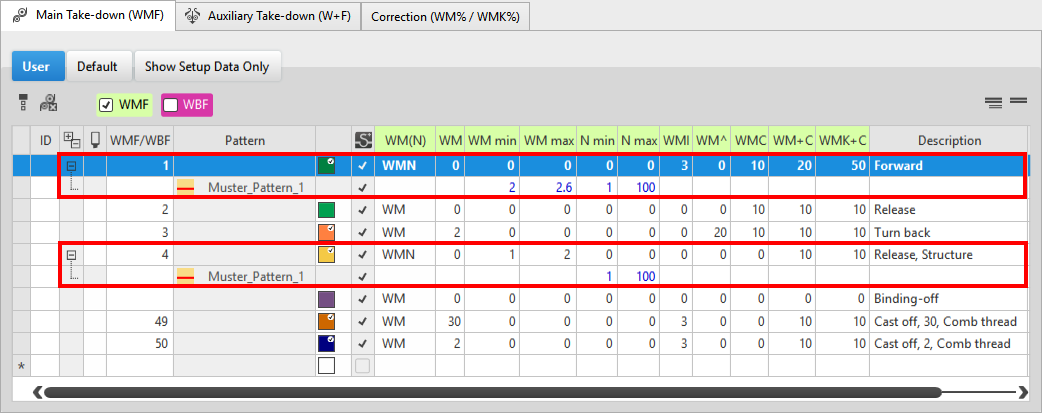
 :
:
Sub-rows with calculated values for some fabric take-down values will be generated by the technical processing.
- Values in the main row = 0
Fabric take-down values in the sub-rows are calculated based on the information in the main row and the pattern width. - Values in the main row > 0
For the sub-rows no new entry is calculated.
Attention:
If you change a value in a sub-row, it will not be adapted automatically when changing the pattern width.