Shape Element Properties and Functions in Context Menu of Shape Elements
- Duplicar
-
 Copiar
 -
 Inverter horizontalmente
 -
 Inverter verticalmente
 -
 Fixar
Fixar -
 Eliminar
 -
 Propriedades do elemento de corte
Procedure:
- 1
- Select the desired shape element.
- 2
- Call-up the context menu of the shape element.
- 3
- Call up the desired menu item.
- The selected function will be executed.
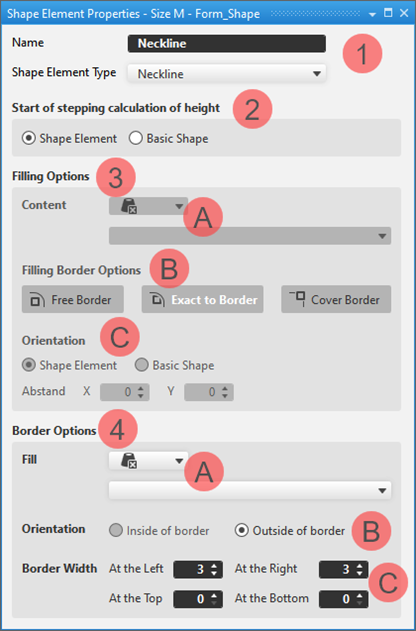
- The Propriedades do elemento de cortecontext menu opens the Propriedades do elemento de corte tool window.
Shape Element Properties
|
| |||
1 | Nome | The name of the shape element is as desired | |
Tipo de elemento de corte | Characteristics of the shape element for processing it within the shape:
| ||
2 | Início do calculo de escalonamento do altura | ||
Elemento de corte | The startpoint of stepping calculation based on the selected stepping kind is the startpoint of the shape element. | ||
Corte base | The startpoint of stepping calculation based on the selected stepping kind is the startpoint of the basic shape (baseline). | ||
3 | Opções de preenchimento | ||
A | Conteúdo | Allocation of a filling color and / or of a knitting element | |
B | Opções de preenchimento de ourela |
| |
C | Alinhamento | ||
Elemento de corte | In the shape element, starting at the reference point of the shape element (bottom left corner of the shape element) a grid is structured with the size of the knitting element. | ||
Corte base | In the shape element, starting at the reference point of the basic shape (bottom left corner of the basic shape) a grid is structured with the size of the knitting element. | ||
Distância X:/ Y | Horizontal and / or vertical shifting of the reference point in the shape element or in the basic shape. | ||
4 | Opções de ourela | ||
A | Conteúdo Enchimento | Allocation of a filling color and / or of a needle action
| |
B | Alinhamento | Entry of a border inward or outward according to the shape element type | |
C | Largura de ourela | Preset of the border width in pixel for the four shape element edges | |
 symbol
 for processing with narrowing / widening modules
 : The shape element type can be changed via the picklist.

