Line Options Bar
|
Espessura da linha |
Enter the Espessura da linha. | |
|
Alinhamento |
|
Desenhar linha à esquerda do cursor. |
|
|
Desenhar linha à esquerda e direita do cursor. | |
|
|
Desenhar linha à direita do cursor. | |
|
Stroke |
Set the length of the strokes of a dash line. | |
|
Espaço |
Set the length of the gaps of a dash line. | |
|
|
Criar uma linha livre. | |
|
|
Create a line with an even step and remainder. | |
|
|
Criar uma linha com um ângulo de 45°. | |
|
|
Criar um escalonamento uniforme. | |
|
|
Cria uma linha com as especificações personalizadas. | |


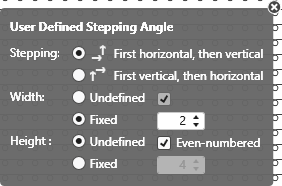
 The following settings are available for user defined lines only:
User Defined Stepping Angle
|
Stepping: |
Specify the sequence of steppings. |
|
|
Execute stepping first horizontally, then vertically. |
|
|
Execute stepping first vertically, then horizontally. |
|
Largura: |
Set the width of the steps. |
|
|
Passos com qualquer largura |
|
|
Passos com largura estabelecida |
|
|
Largura de passo com número par de colunas de malhas. |
|
Altura: |
Set the height of the steps. |
|
|
Passos com qualquer altura |
|
|
Passos com altura estabelecida |
|
|
Altura de passo com número par de fileiras de tricotagem |
|
|
Restaurar comportamento padrão da ferramenta de desenho atual. |
|
|
Aceitar dados do eco de desenho na amostra Only active with |


|
|
Select |
