Status bar of the lined shape
Status bar of the lined shape

In the left area of the status bar are displays that refer to the cursor position.
|
|
Display of the cursor coordinates. |

You can make layout settings for the document window in the right area.
|
|
Exibir eixo de simetria |
|
|
Exibir grelha de malhas |
|
|
Exibir eixos de diagrama |
|
|
Exibir dimensionamentos de controle |
|
|
Exibir os símbolos dos pontos de marcação |
|
|
Ocultar áreas de tricotagem |
|
|
Exibir áreas de tricotagem |
|
|
Exibir áreas de tricotagem (cor de fio) |
|
|
Exibir áreas de tricotagem (cor de CA) |
|
|
Deslocar o objecto selecionado (ponto de corte, marcação de ponto, área de tricotagem ou elemento de corte) com teclas de seta do teclado (ponto de corte só em formato de entrada Malhas) |


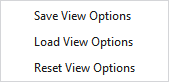
Make the following settings in the context menu of the status bar:
|
Salvar a representação |
Saves the current settings of the status bar as default. New lined shape projects will appear with the saved default settings. |
|
Carregar representação |
Loads the default settings of the status bar. |
|
Restabelecer representação |
Resets the settings of the status bar and the default setting to the STOLL default. |
Veja também
- Working in the line table or in the document window (graphic)
- Fully Fashion-Pattern: Front with V-neck and Structure
- Fully Fashion-Pattern: Front with V-neck and Binding-off
- Fully Fashion-Pattern: Front with neckline and shoulder gore by types of shape elements
- Fully Fashion-Pattern: Back with French Shoulder
- Fully Fashion-Pattern: Fabric Piece with Multi-step Widening and Multi-step Narrowing
- Fully Fashion-Pattern: Front with V-neck and dart type of shape element
- Fully Fashion-Pattern: Front with V-neck and Knitting Ranges