Context menus in the Shape Elements area (line table)
In this area you can find all shape elements of the active line shape.
Using the following context menus you are able to make different settings:
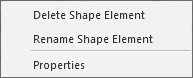
Context menu of a shape element:
|
Eliminar elemento de corte |
Deletes the shape element. |
|
Renomear elemento de corte |
Rename the shape element. |
|
Propriedades |
Opens the Propriedades do elemento de corte dialog box |
Context menu on the empty area:

|
Adicionar novo elemento de corte |
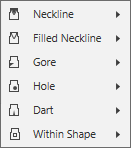
Adds a new shape element. Select the shape type of the new shape element. |

|
|
Inserts a neckline. Symmetrical or asymmetrical. |
|
|
Inserts a filled neckline. Symmetrical or asymmetrical. |
|
|
Inserts a gore area. Symmetrical or asymmetrical. |
|
|
Adds a hole. Symmetrical or asymmetrical. |
|
|
Inserts a dart. Symmetrical or asymmetrical. |
|
|
Inserts an area into the shape, that can be filled with a pattern color and a knitting element. Symmetrical or asymmetrical. |


