Quick Access Toolbar (MC Jacquard Editor)
In the quick access toolbar you have access at any time to the following commands:

Using the drop-down menu you can display and hide the commands in the quick access toolbar and make settings.
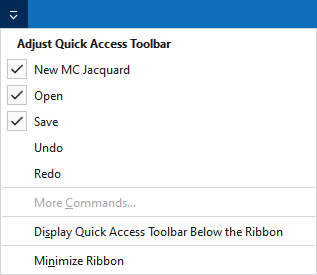
Personalizar a barra de ferramentas de acesso rápido
The following commands can be displayed and hidden in the quick access toolbar:
|
|
Criar um novo Jacquard MC (*.jac). |
|
|
Abrir um arquivo (amostra, elemento de tricotagem, corte). |
|
|
Salvar |
|
|
Desfazer a operação anterior. |
|
|
Repete a operação anterior. |


Make settings for the quick access toolbar and the ribbon:
|
Exibir a barra de ferramentas de acesso rápido abaixo da barra da faixa de opções |
Display the quick access toolbar under or above the ribbon. |
|
Minimizar faixa de opções |
Show or hide the ribbon. |