Duplicate Pattern
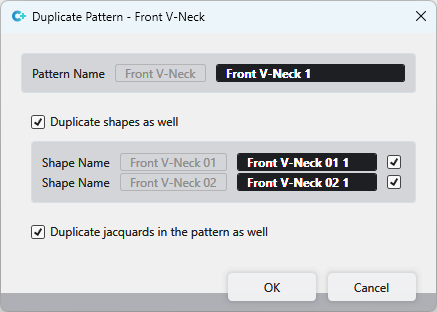
Make the following settings in the Duplicar amostra dialog box:
|
Nome de amostra |
The name of the selected pattern appears greyed out. Enter the new pattern name in the black edit box. |
|
|
|
|
Nome de corte |
Up to two shapes can be positioned on a pattern.
|
|
|
In the Jacquards tool window, copies of the Jacquard entries of the original pattern are created for the newly created pattern. |

 Only available when a pattern with shape is duplicated.
 If the checkbox is not activated, then the shapes are not duplicated.