Sintral (Ribbon Group)
Início tab -> Sintral group
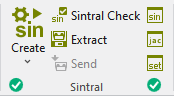
Run the following functions in the Sintral ribbon group:
|
|
Criar programa de tricotagem Cria o programa de tricotagem (SIN, JAC, SET) da amostra ativa após o processamento técnico. Select the desired function in the expander of Create Sintral:
After successfully creating a knitting program, a green highlighted checkmark |
|
|
Controle Sintral Verificar o programa de tricotagem (Sintral) em relação à capacidade de tricotagem e inexistência de erros. Controls the knitting ability and the faultlessness of the generated knitting program during call-up. No additional loading of the knitting program into the Sintral check is necessary. After successfully re-processing the knitting program, a green highlighted checkmark
|
|
|
Extrair Salvar o programa de tricotagem compactado (*.zip) para a máquina de tricotar (com SIN, JAC, SET). If you have made changes in Sintral Jacquard or Setup, then they are also saved when extracting. |
|
|
Enviar Envia o programa de tricotagem (*.zip) para a máquina. Condition: |
|
|
Mostrar Sintral Controlar e corrigir o programa de tricotagem (Sintral) da amostra activa. |
|
|
Exibir Jacquard MC Controlar e corrigir o Jacquard MC da amostra activa. |
|
|
Exibir Setup MC Controlar e corrigir os dados de setup da amostra activa. Alterações não são aplicadas à base. |


 If you want to load and check the knitting program of a different pattern, then call-up the Sintral check using the


- The icons are greyed out before creating the knitting program.
-
 Extrair,
 -
 Sintral,
 -
 Jacquard
 -
 Setup MC.
 - The functions are available after creating the knitting program. In the bottom left of the group appears the
 OK icon.
 - If you edit these files after creating the knitting program, appears the
 Modificado icon in the bottom left of the group.
 - If you edit the symbol view after creating the knitting program, appears the
 Outdated icon in the bottom left of the Sintral group.
 - You are also able to see the status of the processing steps in the Amostra tool window:
Pattern Item - If any errors occur when creating the knitting program, they are displayed in the message line inside the document window.
-
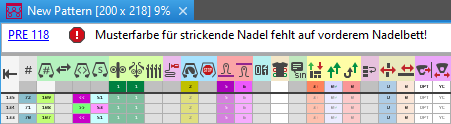
- Click on the error message in order to get more information about the error cause, its position in the pattern and a possible remedy.
Error Messages of Pre-processing or Technical Processing - The creation of the knitting program will be canceled with severe errors.
The error messages are marked with a red icon.
icon. - Warnings are marked with a yellow icon.
The creation of the knitting program is continued. - Processing Step: Generate Knitting Program
- Procedures: Sintral Check and Extracting