Assign CA
|
|
Atribuir automaticamente Color Arrangements The color sequences are checked in the defined search area. If existing CAs match, these CAs are automatically inserted into the area as specified by the settings. |

Make the following settings in the dialog box:
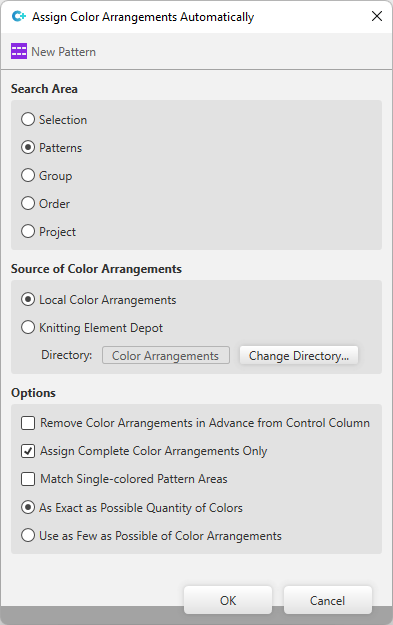
Área de procura
Define area where the CAs are inserted.
|
|
Insert CAs automatically only in the selected area. |
|
|
Insert CAs automatically in the entire pattern. |
|
|
Insert CAs automatically in the entire group.
|
|
|
Insert CAs automatically in the entire order.
|
|
|
Insert CAs automatically in the entire pattern project. |

 Only possible if the project is worked with groups
Origem dos Color Arrangements
Define the directory where the CAs are assigned from.
|
|
Only observe CAs that are available in the local pattern project in the CA tool window. |
|
|
Assign CAs from a knitting element directory. |
|
Diretório: |
Shows the directory where the CAs are assigned from. |
|
Strickelement unter anderem Pfad auswählen... |
Change the directory where the CAs are assigned from. |
Opções
|
|
First removes all available CAs in the search area and then inserts the corresponding CAs. If the checkbox is not active, then CAs are only inserted in the search area in case of matching if no CAs are available. |
|
|
CAs are only inserted completely. |
|
|
Single color areas are taken into account when deleting and entering. |
|
|
If various CAs can be considered for insertion in a situation, then the option with the quantity of colors that fits the best is used. |
|
|
If various CAs can be considered for insertion in a situation, then the option that needs the least amount of Color Arrangements is used. |
