Pattern Properties
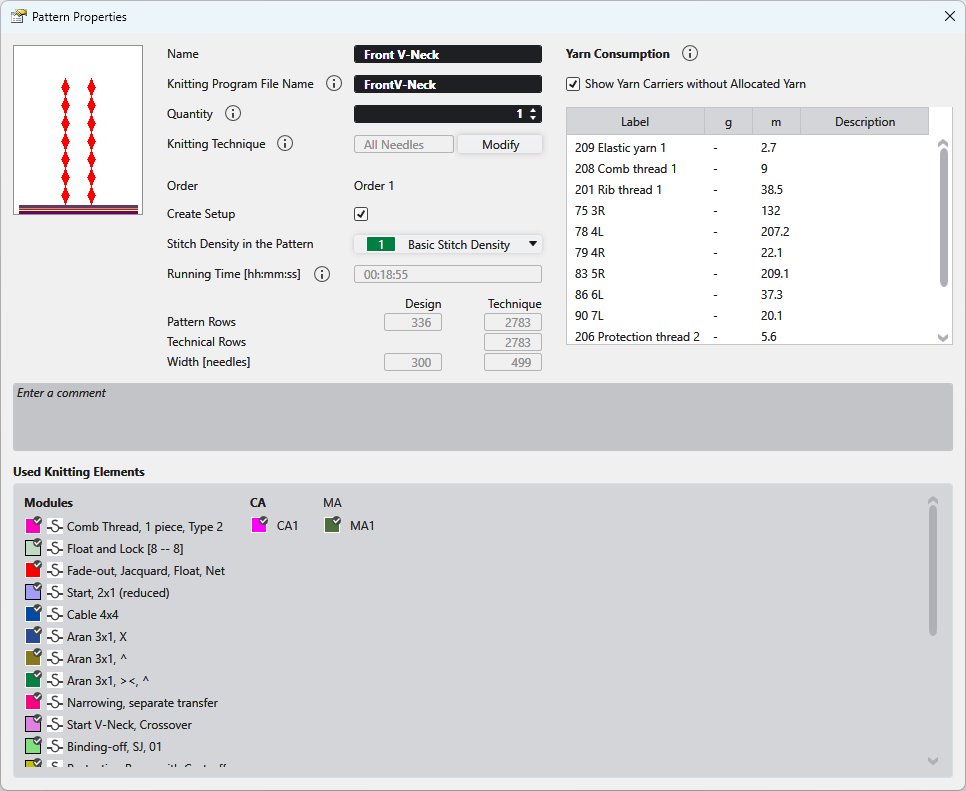
In the Propriedades de amostra dialog box you get the information on the pattern and can make the following settings.
|
Nome |
View and edit the name of the pattern. |
|
Nome do arquivo do programa de tricotagem
|
Enter the name for the knitting program to be created.
|
|
Número |
Enter the quantity of fabric pieces that should be knitted from this pattern in the corresponding order (sequence). |
|
Técnica de tricotagem |
Displays the knitting technique (all needles or 1x1 technique).
|
|
Alterar |
Changes the knitting technique between Todas as agulhas and Técnica 1x1 . |
|
Encomenda |
Displays the name of the order. |
|
Create Setup |
|
|
| |
|
Densidade das malhas na amostra |
Displays the entered stitch density of the pattern. Select an entry from the Densidade das malhas tool window. |
|
Tempo de execução [mm:ss] |
Shows the running time in minutes and seconds.
|
|
Fileiras de amostra |
Displays the pattern rows in the design pattern and after processing. |
|
Fileiras técnicas |
Shows the technical rows. |
|
Largura [agulhas] |
Displays the width in the design pattern and after processing. |
|
Yarn Consumption |
Exibe o consumo de fio em metros [m]. O Valor não está disponível sem realizar o Controle Sintral. Primeiro definir os fios e atribuir os mesmos. (Início -> Parâmetro -> Janela de ferramentas -> Definição de fios / Atribuição de fio)
The specification of the yarn length and the weight relates to the entries in this tool window: Example: |
|
|
Also displays yarn carriers that were not assigned in the Atribuição de fio tool window. |
|
Denominação |
Displays the designation of the yarn from the Atribuição de fio. |
|
g |
Displays the weight of the yarn consumption is gram [g]. |
|
m |
Displays the length of the yarn consumption in meter [m]. |
|
Descrição |
Shows the description of the Definição de fios. |
|
Entrar comentário |
Enter a comment to the pattern. |
|
Elementos de tricotagem utilizados |
Shows the modules, CAs and MAs in use by the pattern. These knitting elements can be opened with a double-click. |