Pattern Properties
In the Propriedades de amostra dialog box you get the information on the pattern and can make the following settings.
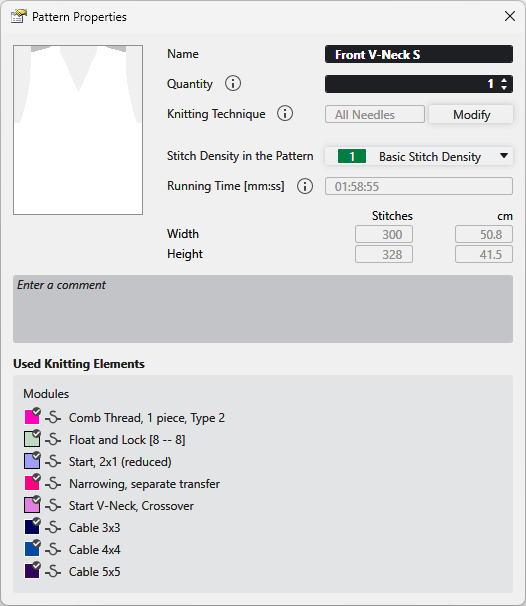
|
Nome |
View and edit the name of the pattern. |
|
Número |
Enter the quantity of fabric pieces to be knitted of this pattern. |
|
Técnica de tricotagem |
Displays the knitting technique (all needles or 1x1 technique).
|
|
Alterar |
Changes the knitting technique between Todas as agulhas and Técnica 1x1 . |
|
Densidade das malhas na amostra |
Displays the entered stitch density of the pattern. Select an entry from the Densidade das malhas tool window. |
|
Tempo de execução [mm:ss] |
Shows the running time in minutes and seconds.
|
|
Largura |
Shows the width of the pattern in Malhas and cm. |
|
Altura |
Shows the height of the pattern in Malhas and cm. |
|
Entrar comentário |
Enter a comment to the pattern. |
|
Elementos de tricotagem utilizados |
Shows the modules in use by the pattern. |

 You have to enable the "odd needle quantity" check box of the shape properties for a pattern with overlying shape in 1x1 technique with an odd quantity of needles.