|
|
|
1
|
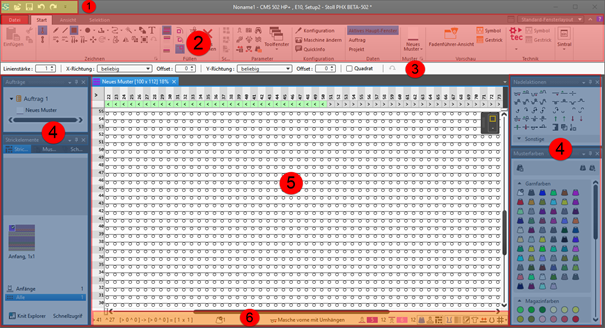
Quick Access Toolbar
|
Adjusting via the  selection list selection list
|
|
2
|
Ribbons
|
Ribbons containing the necessary groups for editing
-
Dosya
-
Başlat
-
Görünüm
-
Seçim
 : The ribbon can be minimized. : The ribbon can be minimized.
|
|
3
|
Properties of Drawing Tools
|
Adjusts to the selected drawing tool
|
|
4
|
Tool Windows
|
Selection of the corresponding tool windows by  in the ribbon in the ribbon
: You can move the tool windows by the Left Mouse Button and dock them to the edges of the main window or position them floating freely.
|
|
5
|
Document Windows
|
Display and editing of pattern information
: You can move the tool windows by the Left Mouse Button and dock them in the center of the main window or position them floating freely.
|
|
6
|
Status Bar
|
-
Information about
- Cursor position
- Size when drawing
- Color and needle action of the design pattern at the cursor position
- Stitch length at the front / at the rear
-
Functions of controlling the view of the pattern
-
 Görünümü dikey böl Görünümü dikey böl -
 Desen rengi with needle action Desen rengi with needle action -
 İğne alanında ön ve arka ilmek uzunluğu İğne alanında ön ve arka ilmek uzunluğu -
 Modül rengi Modül rengi
Shows the module identifying color -
 İlmek uzunluğu grup düzeltmesi (NPGK) İlmek uzunluğu grup düzeltmesi (NPGK)
Display of the colors for the individual NPGK definitions - #1 Görünümü yapılandır...
View (#1-#5) possible -
 Büyük şekil sembolleri
 -
 Yağı gölgelendirmelerini göster Yağı gölgelendirmelerini göster -
 Modül sınırlarını göster Modül sınırlarını göster -
 Yatak kaydırmayı göster Yatak kaydırmayı göster -
 İğne dağılımı göster İğne dağılımı göster -
 İlmek yoğunluğu oranında gösterim İlmek yoğunluğu oranında gösterim -
 Yorumları göster Yorumları göster -
 Izgarayı göster Izgarayı göster -
 : Seçenekler : Seçenekler
Settings for the needle occupancy and the grid -
Additional functions of controlling the view of the pattern after the technical processing
- Show the
 Mekik rengi Mekik rengi -
 Mekikleri göster Mekikleri göster
Display of the yarn carrier paths -
Functions of controlling the view of shapes
-
 Simetri eksenini göster Simetri eksenini göster -
 İlmek kılavuzunu göster İlmek kılavuzunu göster -
 Grafik eksenlerini göster Grafik eksenlerini göster -
 Kontrol ebatlarını göster Kontrol ebatlarını göster -
 Örgü alanlarını gizle Örgü alanlarını gizle -
 Örgü alanlarını göster Örgü alanlarını göster -
 Örgü alanlarını göster (İplik rengi) Örgü alanlarını göster (İplik rengi) -
 Örgü alanlarını göster (CA rengi) Örgü alanlarını göster (CA rengi) -
İşaretleme noktalarının sembollerini göster
-
 Seçili nesne (kesim noktası, işaret noktası, örgü alanı veya kesim elemanı) klavyedeki ok tuşları ile kaydırılır (kesim noktası yalnızca 'ilmek' giriş formatında) Seçili nesne (kesim noktası, işaret noktası, örgü alanı veya kesim elemanı) klavyedeki ok tuşları ile kaydırılır (kesim noktası yalnızca 'ilmek' giriş formatında)
|