Power Tension Setting - NPJ
Adjust the behavior with Power Tension Settings (NPJ ):
- 1
- Open the Pattern Parameters
tool window in the Başlat ribbon under Parametreler and select the
 İlmek uzunluğu section.
 - The İlmek uzunluğu (NP) tool window appears.
- 2
- Make the desired setting in the NPJ column:
|
| |
|
! |
Protect the stitch tension area against a stitch length change |
|
Ekstra sıra |
Pattern row with different stitch lengths is divided, i.e. for each stitch length in one carriage stroke there will be entered a movement of the yarn carrier in the pattern. Result: Longer run time based on the moving of the yarn carrier (kick back). |
|
== |
Stitch tension change in both areas |

|
Setting |
Presentation |
Meaning |
|---|---|---|
|
= |
|
Stitch tension change in both areas |
|
!
|
|
Stitch tension change in the A area |
|
!
|
|
Stitch tension change in the Y area |
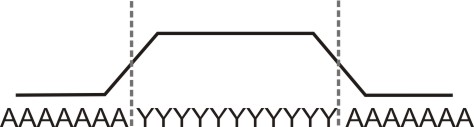
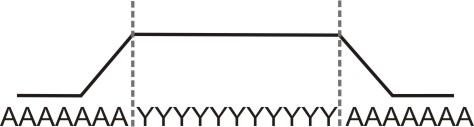
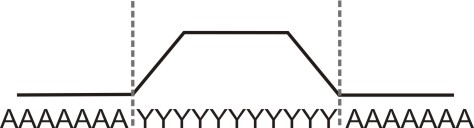
- The default carriage speed in the area of the stitch tension change is MSEC=1.0.
- With the Sintral command MSECNPJ, the carriage speed can be changed in the area of PTS / NPJ.
In the Başlat ribbon under Yapılandırma, open the Yapılandırma tool window, select the Sintral tab and in the section, activate the
  MSECNPJ kullan check box.
Carriage Speed and adjustment values
|
MSECNPJ |
1.0 |
0.9 |
0.8 |
0.7 |
0.6 |
0.5 | ||||||
|---|---|---|---|---|---|---|---|---|---|---|---|---|
|
|
y |
x |
y |
x |
y |
x |
y |
x |
y |
x |
y |
x |
|
E 3 |
1.3 |
1.2 |
1.2 |
1.1 |
1 |
1 |
0.9 |
0.8 |
0.8 |
0.7 |
0.7 |
0.6 |
|
E 3,5 |
1.6 |
1.3 |
1.4 |
1.2 |
1.3 |
1 |
1.1 |
0.9 |
1 |
0.8 |
0.8 |
0.7 |
|
E 5 (2,5.2) |
1.5 |
1.7 |
1.4 |
1.5 |
1.2 |
1.4 |
1 |
1.2 |
0.9 |
1 |
0.8 |
0.9 |
|
E 7 (3,5.2) |
2.1 |
2.1 |
1.9 |
1.9 |
1.7 |
1.7 |
1.5 |
1.5 |
1.3 |
1.3 |
1.1 |
1.1 |
|
E 8 |
2.4 |
2.3 |
2.2 |
2.1 |
1.9 |
1.8 |
1.7 |
1.6 |
1.4 |
1.4 |
1.2 |
1.2 |
|
E 10 (5.2) |
3 |
2.8 |
2.7 |
2.5 |
2.4 |
2.2 |
2.1 |
2 |
1.8 |
1.7 |
1.5 |
1.4 |
|
E 12 (6.2) |
3.6 |
3.3 |
3.2 |
3 |
2.9 |
2.6 |
2.5 |
2.3 |
2.2 |
2 |
1.8 |
1.7 |
|
E 14 (7.2) |
4.2 |
3.7 |
3.8 |
3.3 |
3.4 |
3 |
2.9 |
2.6 |
2.5 |
2.2 |
2.1 |
1.9 |
|
E 16 (8.2) |
4.8 |
4.2 |
4.3 |
3.8 |
3.8 |
3.4 |
3.4 |
2.9 |
2.9 |
2.5 |
2.4 |
2.1 |
|
E 18 (9.2) |
5.4 |
4.6 |
4.9 |
4.1 |
4.3 |
3.7 |
3.8 |
3.2 |
3.2 |
2.8 |
2.7 |
2.3 |
y = Quantity of needles for changing the stitch tension by one value
x = Quantity of needles for the idle time between the stitch tension change
Observe the motif distances and the idle periods so that the machine can process the change of the stitch length.