Tools in the Color Arrangement Editor
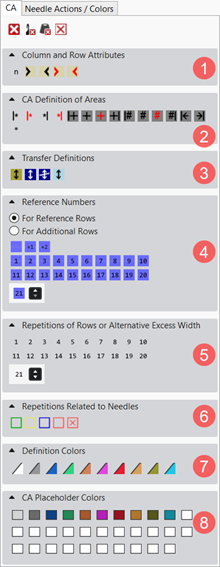
CA tab: Meaning of the Symbols
|
1 |
Sütun ve sıra öznitelikleri | |||
|
|
Referans sütunu |
Marking of the column for the reference numbers | ||
|
|
Dikey tekrar için sütun |
For creating repetitions in the height (cycles) | ||
|
|
Sol kesim alanı sütunu |
Fabric selvedge in the right of the fabric piece center
| ||
|
|
Sağ kesim alanı sütunu |
Fabric selvedge in the fabric piece center left
| ||
|
|
Sol örme paneli sütunu |
Left outer edge of a fabric piece.
| ||
|
|
Sağ örme paneli sütunu |
Right outer edge of a fabric piece.
| ||
|
2 |
RA alan tanımı | |||
|
|
Sol desen boşluğundan itibaren tekrarlama |
Repeat the selected column area within the color relative to the first pattern column. | ||
|
|
Sağa doğru tekrarlama |
Repeat the selected column area starting from the left color field edge. | ||
|
|
Sağ desen boşluğundan itibaren tekrarlama |
Repeat the selected column area within the color relative to the last pattern column. | ||
|
|
Sola doğru tekrarlama |
Repeat the selected column area starting from the right color field edge. | ||
|
|
Artı genişlik, üzerine yazmalı, sol desen kenarından itibaren tekrar ile |
Enter a overwriting additional column on the left relative to the first pattern column of a color area. | ||
|
|
Artı genişlik, üzerine yazmalı |
Enter an overwriting additional column on the left and / or right of a color area. | ||
|
|
Fazla genişlik |
Do not enter an overwriting additional column on the left and / or right of a color area. | ||
|
|
Artı genişlik, üzerine yazmalı, sağ desen kenarından itibaren tekrar ile |
Enter a overwriting additional column on the right relative to the last pattern column of a color area. | ||
|
|
|
Effect: Example: Intarsia Binding | ||
|
|
Şekil kenarında artı genişlik, üzerine yazmalı, sol desen kenarından itibaren tekrar ile |
Enter a overwriting additional column on the left relative to the first pattern column of a color area at the shape edge. | ||
|
|
Şekil kenarında artı genişlik, üzerine yazmalı |
Enter an overwriting additional column on the left and / or right of a color area at the shape edge. | ||
|
|
Şekil kenarında fazla genişlik |
Do not enter an overwriting additional column on the left and / or right of a color area at the shape edge. | ||
|
|
Şekil kenarında artı genişlik, üzerine yazmalı, sağ desen kenarından itibaren tekrar ile |
Enter a overwriting additional column on the right relative to the last pattern column of a color area at the shape edge. | ||
|
|
|
Effect:
| ||
|
|
Sol örgü kenarı |
Fading-out at the left fabric selvedge by the drawn-in width . | ||
|
|
Sağ örgü kenarı |
Fading-out at the right fabric selvedge by the drawn-in width. | ||
|
|
Sıra tekrarı |
For defining cycles in the
| ||
|
|
Arama sırasındaki şeklin dışında |
For defining specifications in the needle bed in the area at the left of the #L counter and in the area at the right of the #R counter, also for specifying outside shape.
| ||
|
3 |
Aktarma tanımları | |||
|
|
Şekil-aktarma ön verileri |
Specify the pattern rows for transferring the narrowings and widenings | ||
|
|
Yapısal aktarma için ön veriler |
Specify the pattern rows for transferring the structures. | ||
|
|
Do not allow structure transferring |
Specify the pattern row in which the transferring of the structure is not allowed | ||
|
|
Otomatik aktarma için ön veriler |
Specify the pattern rows for auto transferring | ||
|
4 |
Referans numaraları | |||
|
| ||||
|
|
Referans sırası numarasını koru |
The previous reference row number is retained, i. e. that the reference row number will not be incremented. | ||
|
|
Referans sırası numarasını 1 artır |
Edited reference row number will be increased by 1 for further editing.
| ||
|
|
Referans sırası numarasını 2 artır |
Edited reference row number will be increased by 2 for further editing, i.e. one pattern row is skipped. | ||
|
|
Reference Row Number from 1 to 20 |
Selection of the reference row numbers for numbering the reference rows in the design pattern | ||
|
|
|
Selection of further reference row numbers greater than 20 | ||
|
| ||||
|
|
Retain the number of additional row |
The previous reference row number is retained, i. e. that the reference row number will not be incremented. | ||
|
|
Increase the number of additional row by 1 |
Edited reference row number will be increased by 1 for further editing. | ||
|
|
Increase the number of additional row by 2 |
Edited reference row number will be increased by 2 for further editing, i.e. one pattern row is skipped. | ||
|
|
Number of additional row from 1 to 20 |
Selection of the additional row number for numbering the additional rows in the Color Arrangement | ||
|
|
|
Selection of further reference additional row numbers greater than 20 | ||
|
5 |
Sıra tekrarı / alternatif fazla genişlik | |||
|
|
Repeating of rows or excess width 1 to 20 |
Numbers for defining
| ||
|
|
Repeating of rows or excess width 21 and higher | |||
|
6 |
İğne ile ilgili tekrarlar | |||
|
|
Alan başlangıcı |
Select areas and define them according to the type of knitting element.
| ||
|
|
Birinci tekrar | |||
|
|
Sonraki tekrar | |||
|
|
Alan sil |
Delete the marked areas | ||
|
7 |
Tanımlama renkleri | |||
|
|
For visual marking of
| |||


 : Corresponds to


 to
to 

 to
to 


 to
to 