Properties of Knitting Elements
The properties define the behavior, the appearance and the size of a knitting element.
Özellikler Dialog Box:
- 1
- Select module.
- 2
- Open the context menu.
- 3
- Select
 Özellikler.
 - The Özellikler dialog box will appear.
Example:
Özellikler
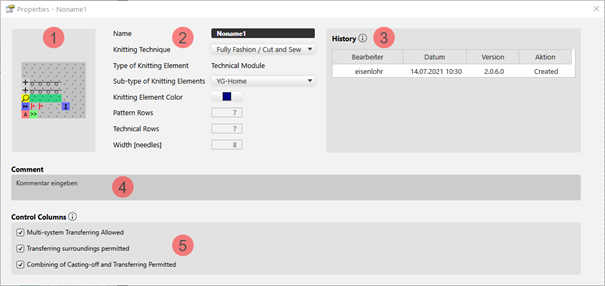
dialog box for a technical module
|
| ||||
|
1 |
Graphic presentation of the selected type of knitting element | |||
|
2 |
Ad |
Name of the knitting element | ||
|
Örme tekniği |
Definition of the knitting technique for the use within the pattern | |||
|
Örme elemanı tipi |
Display of the selected type of knitting element
| |||
|
Örme elemanı alt tipi |
Selection of sub-types according to the selected knitting element type
| |||
|
Örme elemanı rengi |
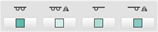
Definition of a color for the display of the knitting element in the | |||
|
|
Display color for the different knitting elements or modules | |||
|
|
Display color for structure modules with the different knitting techniques | |||
|
Desen sıraları |
Quantity of pattern rows in the knitting element | |||
|
Teknik sırası |
Quantity of technical rows in the knitting element | |||
|
Genişlik [iğneler] |
Quantity of needles within one row of the knitting element | |||
|
3 |
Geçmiş |
Display of state of editing from creation until the last modification: Düzenleyen Tarih Sürüm İşlem | ||
|
4 |
Yorum |
Entry of a comment or a description | ||
|
5 |
Kumanda sütunları |
Control Column Options
| ||
|
|
Options not allowed suppress the corresponding function in the control columns within the area of this knitting element. | |||
|
|
Allowed options enable the corresponding function in the control columns within the area of the knitting element. | |||
 : As defined when creating.
 document window with the



- 4
- Make the desired settings.
- 5
- Close the dialog box with
 .
.
- The properties are applied when using it in the pattern.