Displaying and changing marking point properties
Types of marking points
- Markings that are assigned to a shape line.
 : Displayed in
  Çizgi özellikleri
 - Knitting element for the start of the V-neck
- Markings / marking points, which are allocated to a shape element: Displayed in
 İşaret noktası özellikleri
 - Markings for sewing on a pocket
- Markings for sewing on buttons
- etc.
Displaying and changing marking point properties:
- In the
 document window
 - Position the cursor on a marking point in the displayed graphic -> open the context menu with RMB and select -> İşaret noktası özellikleri and make the desired entries in the tool window.
- With the İşaret noktası özellikleri button in the ribbon, open the tool window and make the desired entries.
|
|
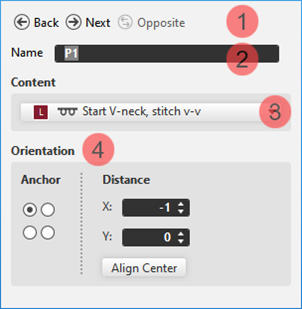
1 |
Buttons for switching between the created marking points | |
|
2 |
Name of the selected marking point
| ||
|
3 |
Used knitting element as marking | ||
|
4 |
Positioning of the knitting element at the marking point | ||
|
Anchor: |
Corresponds to the reference point in a knitting element.
| ||
|
Distance |
Offset in x direction and y direction for positioning the assigned knitting element regarding the marking point depending on the set anchor point | ||
|
Align Center |
Centers the assigned knitting element at the anchor point | ||
- In the Line Table: only possible if the marking was assigned to a shape line.
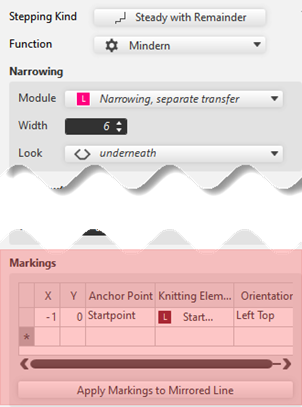
- Select a line in the table -> open the tool window with the Çizgi özellikleri button and make the desired entries under .
|
|
X |
Offset in x direction and y direction for positioning the assigned knitting element |
|
Y | ||
|
Anchor Point |
| |
|
Knitting Element |
Display and selection of a knitting element | |
|
Orientation |
Positioning of the knitting element at the marking point | |
|
Apply Markings to Mirrored Line |
Applies the line-bound markings to the current line to the opposite line.
|