Shape Symbols
Kalıb sembolleri
Başlat tab -> Araç penceresi -> Kalıb sembolleri
In the Kalıb sembolleri tool window select the shape symbols to draw.
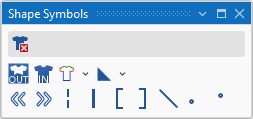
|
|
Şekil verilerini sil Can be selected in addition (with the CTRL key pressed) to a shape symbol. Only the selected shape symbol is deleted when drawing. All the other shape symbols are retained. |
|
|
Şekil dışında |
|
|
Şekil dahilinde |
|
|
Şekil kenarları (F2)
|
|
|
Kalıp İşaretleri
|
|
|
Hizalama sola doğru |
|
|
Hizalama sağa doğru |
|
|
Tiktak örgü |
|
|
Ayırma |
|
|
Yaka açıklığını doldur |
|
|
Yaka açıklığını doldur |
|
|
Soluklaştırma |
|
|
Ön şekil kenarındaki ilmek uzunluğu |
|
|
Arka şekil kenarındaki ilmek uzunluğu |


 A selected shape symbol overwrites the existing shape symbols when inserting it into the pattern. You can enter it additionally with the CTRL key pressed. You can remove it by the CTRL-ALT key.