User Interface
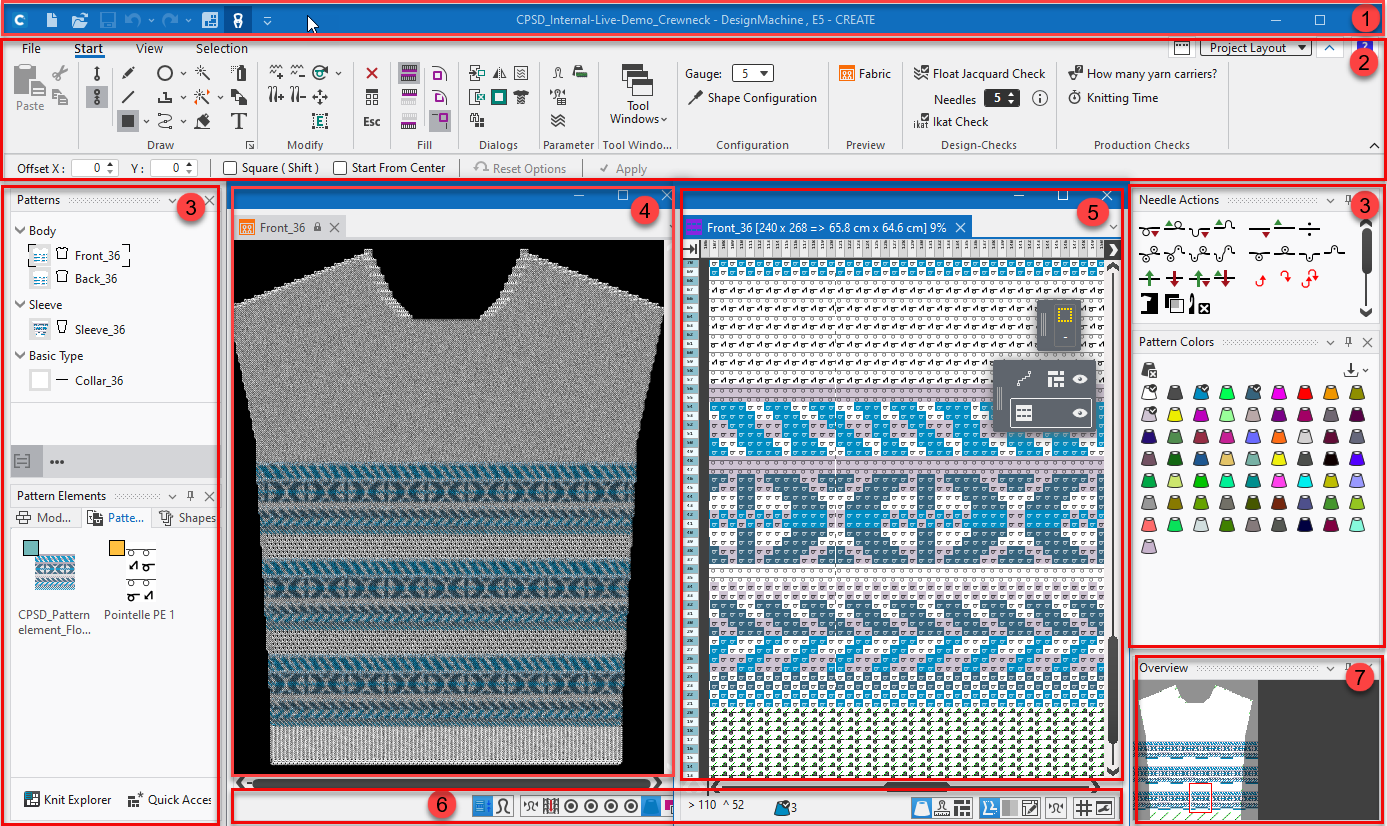
The user interface is based on the new patterning software CREATE PLUS for knitting technicians. This should also facilitate communication and digital data transfer between knit ware designers and knitting technicians.
The scope of functions has been adapted for knit ware designers and is intended to enable simple and intuitive work with the software program.
The user interface is essentially divided into several segments:
|
Designation of the segments |
Scope of functions |
Shortcut |
|---|---|---|
|
1 Quick Access Toolbar |
|
Ctrl+N Ctrl+O Ctrl+S Ctrl+Z Ctrl+Y F3 |
|
2 Ribbons |
Containing the necessary groups for editing:
| |
|
3 Tool Windows |
| |
|
4 |
Fabric View |
|
|
5 |
Document Windows Display and editing of the design pattern |
|
|
6 |
Status Bar and Display Options Information about cursor position, sizes when drawing, colors and needle actions at the cursor position within the design pattern, stitch lengths at front and rear in use |
|
|
7 |
Overview Overview and quick navigation within the document window |
|


