Marking Point Properties
Başlat tab -> Özellikler group ->  İşaret noktası özellikleri
 If you have opened a shape in the pattern project, you can find the İşaret noktası özellikleri tool window under the Kesim düzenleme tab -> Özellikler group.
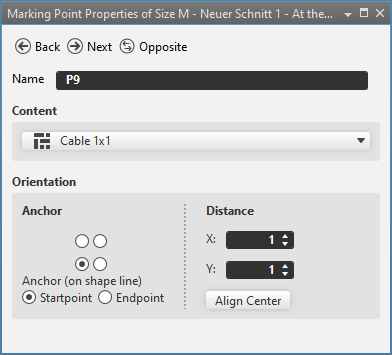
In the İşaret noktası özellikleri tool window you make the following settings for the marking points.
|
|
Seçilen nesneden aynı türde bir önceki nesneye geçilir |
|
|
Seçilen nesneden aynı türde bir sonraki nesneye geçilir |
|
|
Seçilen nesneden yansıtılmış nesneye geçilir. Sadece simetrik nesnelerde kullanılabilir. |
|
Ad |
Name of the selected marking point. |
|
Kapsam |
Select a Örme elemanı that is inserted as a marking.
|
|
Hizalama |
Specify the Hizalama of the marking. |
|
Demir atma |
Using the
|
|
Demir atma (kesim çizgisinde) |
Specify the anchor on the shape line. Only available for markings on shape lines. |
|
|
Demir atma is located on the startpoint of the shape line. |
|
|
Demir atma is located on the endpoint of the shape line. |
|
İç boşluk |
Enter distance to Demir atma. |
|
X |
Enter X-coordinate of Pozisyon. |
|
Y |
Enter Y coordinate of Pozisyon. |
|
Ortala |
Inserts the knitting element centered. |


 options, specify the orientation of the knitting element.