Example 01: Excess Width and Excess Width, Overwriting
Opening pattern projects of former releases prior to V 2.x.x:
The symbols  ,
,  will be automatically converted to
  and
and  when opening.
- Widening the color field with intarsia knitting process
-
Fazla genişlik
 / Şekil kenarında fazla genişlik
 : New icons with the behavior of the former
 icons.
- Widening the color field for fading-out the fabric
-
Artı genişlik, üzerine yazmalı (
 ,
,  ) / Şekil kenarında artı genişlik, üzerine yazmalı (
 ,
,  ): This symbols have a new behavior.
Generate Color Arrangement:
-
 Tasarım deseni with the necessary colors is created.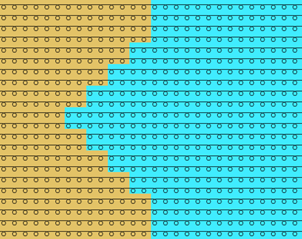
- 1
- Select the desired rows in the Sıra control column.
- 2
- Position the cursor in the pattern area.
- 3
- Open the context menu with RMB.
- 4
- Select Seçimden oluştur / Color Arrangement
- The Color Arrangement Editor will be opened.
- 5
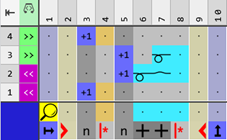
- Insert the desired quantity of columns or rows for the widening at the left or right.
- 6
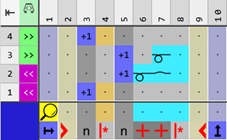
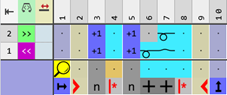
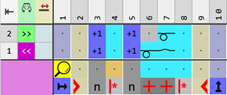
- Make the desired entries with the tools for Color Arrangement from the CA and İğne hareketleri / renkler tabs.
|
Behavior with intarsia knitting process | ||
|
Behavior of the symbol
| ||
|
CA1_A |
|
|
|
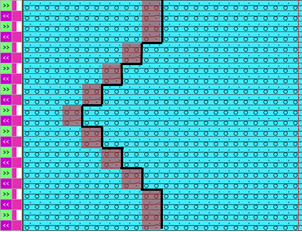
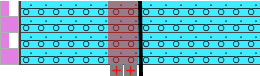
Result:
| ||
|
| ||
|
Behavior of the new symbol
| ||
|
CA1_B |
|
|
|
|
Result:
| |
|
| ||
|
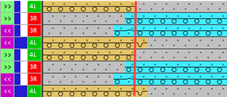
Behavior with yarn carriers that knit using two or more search colors | ||
|
New behavior of the symbol
| ||
|
CA2_A |
|
|
|
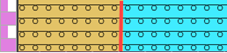
Result:
| ||
|
| ||
|
New behavior of the new symbol | ||
|
CA2_B |
|
|
|
Result:
| ||
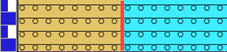
 (=
(= 
- 7
- Check the generated Color Arrangement regarding its correctness with the
 Kontrol et button.
 - 8
- Then apply the changes with the
 Uygula button.
 - Color Arrangement is saved locally in the
 CA tool window.
 - 9
- Enter the generated Color Arrangement in the desired rows in the design pattern.
- The Color Arrangement is expanded by the technical processing.