Quick Access Toolbar
In the quick access toolbar you have access at any time to the following commands:
 The quick access toolbar can be found at the left border of the title bar.

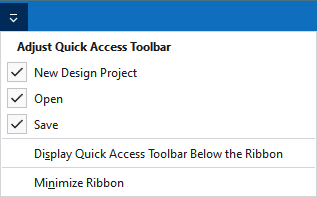
Using the drop-down menu you can display and hide some commands in the quick access toolbar.
Make settings for the presentation of the ribbon.
|
|
Yeni tasarım projesi oluşturulur. |
|
|
Bir dosya (desen, örme elemanı, kesim) açın. |
|
|
Kaydet |
|
|
Önceki işlem geri alınır. |
|
|
Önceki işlemi yineler. |
|
|
Örme elemanları, yani modüller, CA, MA ve desen parçaları, Knit Explorer'da düzenlenir. This command is always available in the quick access toolbar and cannot be hidden. |
|
Hızlı erişim araç çubuğunu şerit çubuğunun altında göster |
Display the quick access toolbar under or above the ribbon. |
|
Menü şeridini simge durumuna küçült |
Show or hide the ribbon. |


