Context menu on the icon of the symbol view
You have access to the following functions in the context menu of the  icon of the symbol view:
 The icon of the symbol view of the pattern appears in this shape after the technical processing.
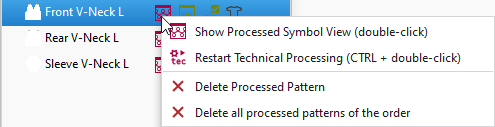
|
|
Opens the the symbol view after processing. |
|
|
Restarts the technical processing. |
|
|
Deletes the processed pattern. |
|
|
Deletes all the processed patterns of the group. Only active in the group view. |
|
|
Deletes all processed patterns of the order. Only active in the order view. |

