Line Options Bar
|
Çizgi kalınlığı |
Enter the Çizgi kalınlığı. | |
|
Hizalama |
|
İmlecin soluna çizgi çekilir. |
|
|
İmlecin soluna ve sağına çizgi çekilir. | |
|
|
İmlecin sağına çizgi çekilir. | |
|
Çizgi |
Set the length of the strokes of a dash line. | |
|
Boşluk |
Set the length of the gaps of a dash line. | |
|
|
Boş bir çizgi oluşturulur. | |
|
|
Create a line with an even step and remainder. | |
|
|
45° açı içinde bir çizgi oluşturulur. | |
|
|
Eşit bir basamaklama oluşturulur. | |
|
|
Kullanıcı tanımlı basamaklandırma bilgileri ile bir çizgi oluşturur. | |


 The following settings are available for user defined lines only:
User Defined Stepping Angle
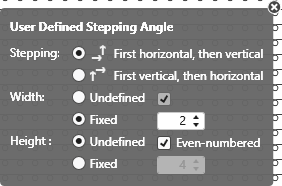
|
Stepping: |
Specify the sequence of steppings. |
|
|
Execute stepping first horizontally, then vertically. |
|
|
Execute stepping first vertically, then horizontally. |
|
Genişlik: |
Set the width of the steps. |
|
|
Rastgele genişliğe sahip basamaklar |
|
|
Sabit genişliğe sahip basamaklar |
|
|
Çift sayılı ilmek çubukları ile basamak genişliği |
|
Yükseklik: |
Set the height of the steps. |
|
|
Rastgele yüksekliğe sahip basamaklar |
|
|
Sabit yüksekliğe sahip basamaklar |
|
|
Çift sayılı örgü sıraları ile basamak yüksekliği |
|
|
Güncel çizim aracının standart davranışını geri yükleyin. |
|
|
Verileri çizim ilmek yankısından desene uygula Only active with |


|
|
Select |
