Module Arrangement
|
|
Make the settings for the Module Arrangements. Select, edit and draw Module Arrangements. |

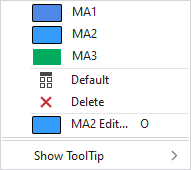
In the context menu you have the following options:
|
|
Select a Module Arrangement to draw. All Module Arrangements available in the pattern are offered for selection. |
|
|
Sets the setting on Varsayılan.
|
|
|
Deletes the entry. |
|
|
Open and edit the Module Arrangement of the cursor position. |
|
HızlıBilgi göster |
 MA1
MA1 MA3
MA3
 Applies the entry of the default setting from the header row.


Further information: