Shape Elements tool window
Tool Window Kesim elemanları
In the upper right of the document window appears the Kesim elemanları tool window.
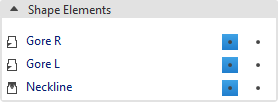
All shape elements available in the basic shape are displayed in the Kesim elemanları tool window.
Make the following settings for each shape element:
|
|
Shape Element is Görünür and Kaydırılabilir. |
|
|
Shape Element is not Görünür but Kaydırılabilir. |
|
|
Shape Element is Görünür but not Kaydırılabilir. |


Make the following settings in the context menu of the entries:
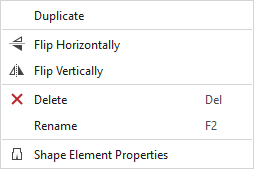
|
Çoğalt |
Duplicates the shape element. |
|
|
Flip shape element horizontally. |
|
|
Flip shape element vertically. |
|
|
Delete the shape element. |
|
Adı değiştir |
Rename the shape element |
|
|
Opens the Kesim elemanı özellikleri tool window. |


