Pattern Elements (Find)
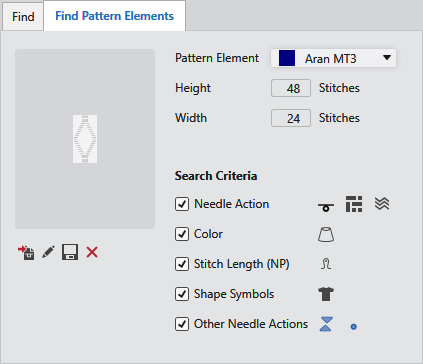
|
Desen parçası seçimi: |
Select the pattern element. All pattern elements of the pattern are available in the drop-down list box. |
|
Yükseklik |
Displays the height in stitches of the selected pattern element. |
|
Genişlik |
Displays the width in stitches of the selected pattern element. |
|
Arama ölçütleri |
Select the search criteria of the pattern element to be searched for. |
|
|
Search for knitting elements, Jacquards or needle actions of the selected pattern element. |
|
|
Search for the color of the selected pattern element. |
|
|
Search for the stitch length of the selected pattern element. |
|
|
Search for the shape symbols of the selected pattern element. |
|
|
Search for other needle actions of the selected pattern element. |
|
|
Create a temporary pattern element from the selection and insert in the search criteria. If you have created a temporary pattern element from a selection and applied the search criteria, then in the Desen parçası seçimi: appears Geçici desen parçası |
|
|
Open and edit the selected pattern element.
If you have edited a temporary pattern element, then in the Desen parçası seçimi: appears Düzenlenmiş geçici desen parçası |
|
|
Save the edited pattern element as new pattern element in the Desen parçası tool window. |
|
|
Delete the temporary pattern element. |


 The opened pattern element is only opened temporarily from the search criteria and saved there again with the changes.
