Context Menu of the Editing Area
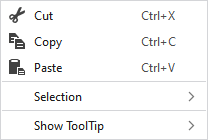
Make the following settings in the context menu of the editing area:
|
|
Seçimin içeriğini siler ve panoya kopyalar. | |
|
|
Seçimin içeriğini panoya kopyalar. | |
|
|
Kopyalanan veya kesilen öğeleri seçilen konuma yapıştırır. | |
|
Seçim |
MC jakarı... |
Generate a new MC Jacquard from the selected area. The Yeni MC jakarı dialog box appears. |
|
Select |
The functions of the menu bar Seçim are also available in the context menu. | |
|
Koru |
A selection can be protected from interventions. | |
|
HızlıBilgi göster |
|
Activates the tooltip in the needle area. |
|
|
Activates the tooltip in the control columns. | |
|
|
The coordinates of the drawing are shown when drawing. | |


