Options (tool window)
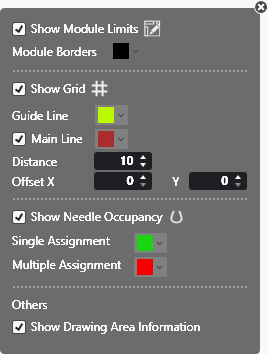
Make the following settings in the Seçenekler tool window:
|
|
Display or hide module borders. |
|
Modül sınırları
|
Select the color of the module borders. |
|
|
Show or hide the grid. |
|
Yardımcı çizgi
|
Change the color of the help lines. |
|
|
Show or hide the main lines. Change the color of the main line. |
|
İç boşluk
|
Enter the distance of main lines. |
|
Ofset
|
Enter offset, which the main lines are used from. |
|
|
Display or hide needle occupancy. |
|
Tek kullanım
|
Change the color displaying the single assignment. |
|
Çok kullanım
|
Change the color displaying the multiple assignment. |
|
|
Display and hide the coordinates view in the documents window. |


