Find and Edit / Replace
The Ara and Düzenle / Değiştir sections appear when you select a module type in the Özellikler pane.
Select the module to be found in the Ara pane. And the module to be inserted in the Düzenle / Değiştir pane.
The following dialog box appears for each section:
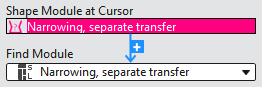
There are two ways to select the modules:
- Select a module directly in the drop-down menu.
All available modules from the database can be selected.
Only modules which are present in the pattern appear in the Ara pane. - If you click on a module in the pattern or pick it by F7 from the pattern, then this module appears highlighted in red at İmleçteki şekil modülü.
Then you can insert it by the light blue + to the selection menu.