Project Settings
Dosya tab -> Call-up Seçenekler selection.
Select the Seçenekler section in the  Project Settings dialog box.
Make the following settings in the Project Settings section:
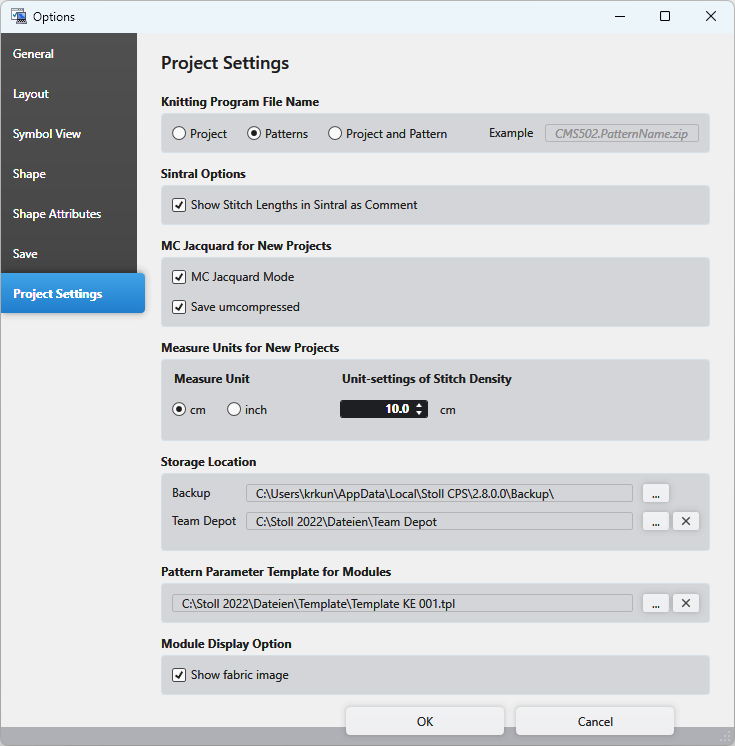
Örme programı dosya adı
|
|
Select the composition of the knitting program names. |
|
Örnek |
An example of the selection is displayed |

Sintral Options
|
|
All the NP values used in the pattern are displayed as comment within the Sintral. |
|
|
The NP values are not displayed as comment within Sintral. |


MC Jacquard for New Projects
|
|
You can draw with Jacquard symbols into the following areas when the function is active:
|
|
|
MC Jacquard will always be saved uncompressed. |
 The Jacquard symbols will appear below the status bar of the document windows.
Measure Units for New Projects
|
Ölçü birimi |
Select the measure unit.
|
|
İlmik yoğunluğu için referans ölçü |
Enter the reference measure for the stitch density in the set measure unit. |

Storage Location
|
Yol |
Select the path on which the backup is saved. |
|
Team Depot |
Select the path to a network or cloud folder on which the knitting elements are saved.
|
 The knitting elements stored there can be used jointly by different users.
Pattern Parameter Template for Modules
Define a Pattern Parameter Template for for new modules.
Representation of the module
|
Show Fabric Image |
|
|
|