|
Makine
|
- As desired
- Example for CMS 530 HP,E3,5.2 (classification 656)
|
|
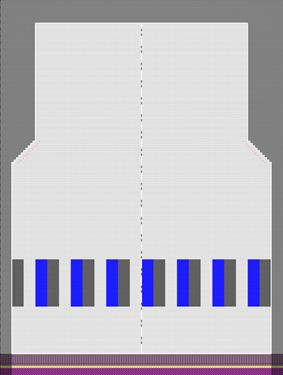
|
-
Örme tekniği
-
Dolgu elemanları
- any yarn color
-
Aktarmalı ön ilmek
-
Başlangıç
-
Başlama, 1x1 :
-
1 sistem
-
Elastomer iplik olmadan
-
Koruyucu iplik ile
-
Gevşek sıra
|
|
Desen projesi
|
Pattern-11A.spf
|
|
Çizgi kesimi projesi
|
Create private lined shape in Desen projesi
|
|
|
- Create new lined shape:
-
 Yeni çizgi kesimi projesi
- Working with
 Örgü alanları: Örgü alanları: - Allocating a Color Arrangement
|
|

|
- Create a pattern project with one pattern.
- Draw design pattern (basic pattern) SJ structure
- Generate pattern element
- Create Color Arrangement for the pattern element
- Create private shape as lined shape in the pattern project
- Create and insert knitting areas
- Position private shape in the basic pattern.
- Start the Technical Processing.
- Generate knitting program (Sintral, Jacquard, Setup).
- Run the Sintral Check.
- Load and set up the knitting program on the machine.
|