Usage of Preset Stepping
Stepping Kind Öngörülen basamaklama
 :
:
- With a preset stepping, it is not always possible to reach any desired target point!
Example:
- If only even-numbered steps have been specified, no target point can be reached at an odd-numbered position.
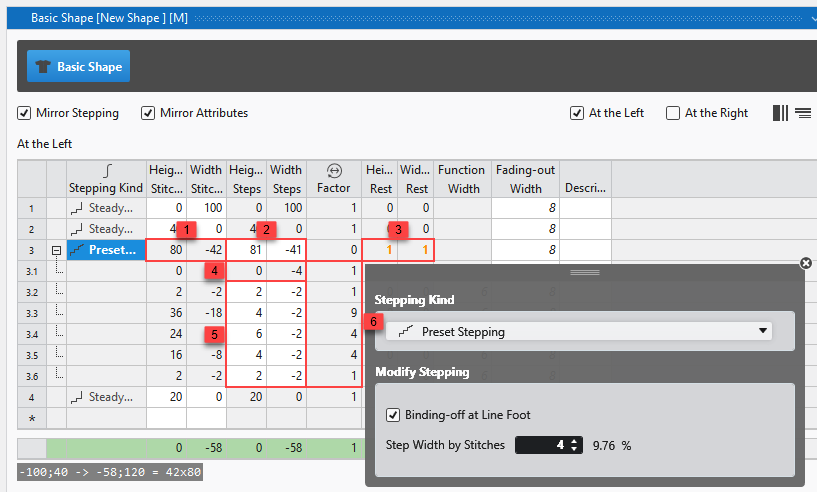
Therefore, the line table contains the following information for a preset stepping:
|
1 |
Actual height and width of the line
|
|
2 |
Desired height and width of the line in total
|
|
3 |
Deviation of the calculated target point in height and width The deviation of the actually reached target point from the desired target point is displayed in red. |
|
4 |
Bind-off Step The width of the bind-off step is specified via the line properties. The total bind-off width is calculated and determined by the factor. |
|
5 |
Preset Stepping The preset stepping is specified by the user. |
|
6 |
Factor of the stepping The factor for each step is calculated so that the desired overall height and width of the line is achieved as precisely as possible. |
Deviating target point of a line
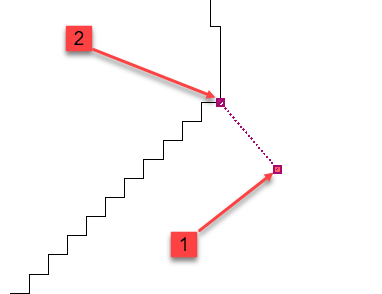
If the desired target point of a line is not reached in the lined shape, both points are displayed separately.
|
1 |
Desired Target Point |
|
2 |
Actually Achieved Target Point |
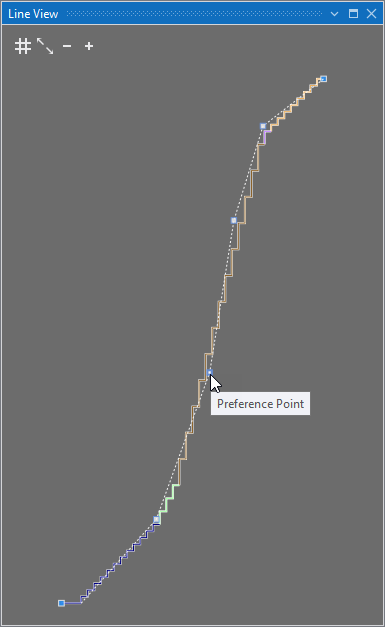
Line View
In addition to the stepping line, a dashed line appears.
- You can set preference points on the line and remove them via the context menu.
- Öncelik noktası ekle
- Öncelik noktasını sil
- The stepping line adapts to this curve as closely as possible, according to the preset stepping.
- You can move the preference points as desired.
This means, you can form the line as desired according to the preset stepping.