Technique (Ribbon Group)
Başlat tab -> Teknik group
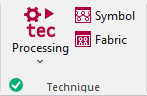
Run the following functions in the Teknik ribbon group:
|
|
Technique Etkin desenin teknik işlemi başlatılır. Select the desired function in the expander under Technique:
|
|
|
Sembol Desen tekniğe göre kontrol edilir ve düzeltilir. Değişiklikler, teknik işlemin tekrar uygulanmasıyla kaybolacaktır. |
|
|
Örgü Teknik sonrası desen gerçeğe yakın ilmek görünümü yardımıyla kontrol edilir. Bu önizlemeyi düzenleyemezsiniz. |


 Before the Teknik işlem the
  Sembol and
  Örgü icons are greyed out.
After the Teknik işlem the icons appear with color. In the bottom left of the group appears the  Tamam icon.
If you edit the processed symbol view after the Teknik işlem, appears the  Pin icon, in the bottom left of the Teknik group.
If you edit the unprocessed symbol view after the Teknik işlem, appears the  Outdated icon, in the bottom left of the Teknik group.
If any errors occur in the Teknik işlem, they are displayed in the message line inside the document window.
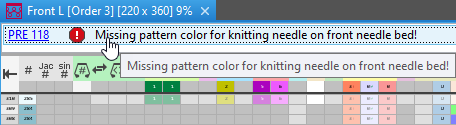
Click on the error message in order to get more information about the error cause, its position in the pattern and a possible remedy.
- The Teknik işlem will be canceled with severe errors.
The error messages are marked with a red icon.
icon. - Warnings are marked with a yellow icon.
The Teknik işlem is continued.