Create Jacquard
Jakar oluştur
To generate a Jacquard in the pattern, mark the desired area in the pattern and open the context menu.
Click on Seçimden oluştur -> Jakar oluştur...
The Jakar oluştur dialog box appears.
Make the desired settings in the dialog box and click on Jakar oluştur.
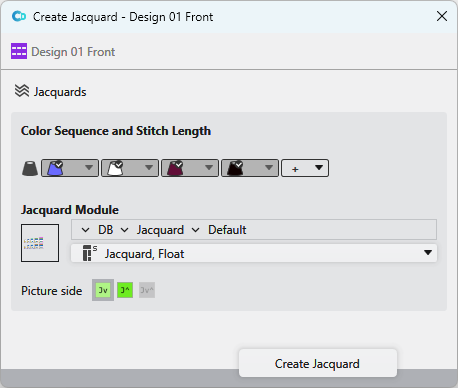
You make the following settings in the Jakar oluştur dialog box:
|
|
Opens the Jakarlar tool window. |
|
Renk sıralaması ve ilmek uzunluğu
|
Define the color sequence of the Jacquard.
|
|
|
Opens the Knit Explorer. |
|
DB |
Select the path from the Knit Explorer directly. For this click on the arrow |
|
|
Select a module for the Jacquard from the drop-down menu. |
|
Resim tarafı |
You have three alternatives:
|


 appears above the system. Move the system by drag-and-drop on this button and change the color sequence with it.
 button.
 .
.


 Jv:
Jv:  J^:
J^:  Jv^:
Jv^:  : not possible with all Jacquard modules.