Remove the Sleeve Fabric Piece
How to remove the Sleeve fabric piece:
- 1
- Click on the polyline of the sleeve.
- The frame of the Sleeve edit field appears.
- 2
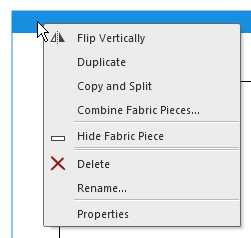
- Open the context menu in the title of the Sleeve edit field.
- 3
- Select .
- The prompt Delete Fabric Piece appears.
- 4
- Confirm with
 .
. - The Sleeve fabric piece is deleted.
- The Sleeve edit box is deleted.
- Sub-rows for the sleeve will be deleted from the measure table.
Direct input within the sub-rows will get lost.