Group assignment
- If you want to assign a storage feed wheel to a yarn carrier, you first have to create the groups in the Mekikler tool window, İplik besleme cihazlarını gruplandır tab.
Group Feed Wheels Tab - For every one of these groups select a feed wheel and assign the desired yarn carrier.
- The assigned yarn carriers then appear in the Y -> Grup tab , as well as the specification of the group and the selected feed wheel type, and they can be edited.
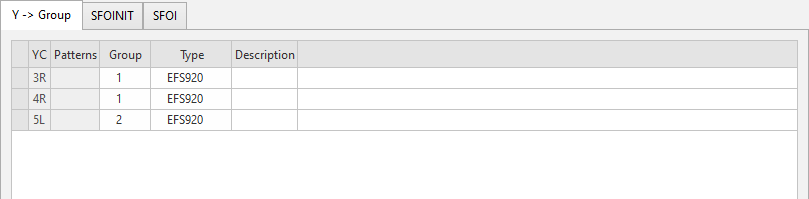
You make the following settings on the Y -> Grup tab:
|
YC |
Grup ataması için mekiği gösterir. |
|
Desen |
Grup ataması için deseni gösterir. |
|
Grup |
Ortak ayarlar için iplik besleme cihazı grubu belirlenir. |
|
Tür |
Grubun iplik besleme cihazı tipi belirlenir. The basic setting for the feed wheel type is made in the Yapılandırma dialog box / Makine öznitelikleri tab / Elektronik iplik besleme cihazları section.
|
|
Açıklama |
Girdinin kullanımı ile ilgili bilgi. Buraya bir metin girebilirsiniz. |