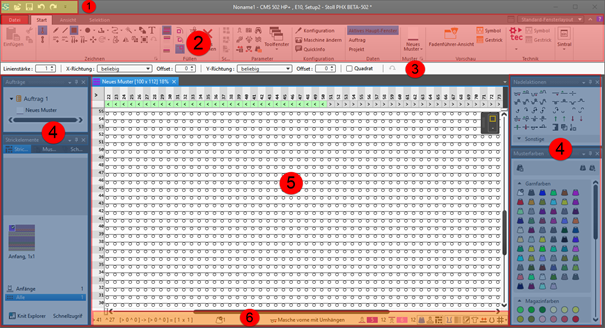
User Interface of CREATE PLUS

1

Quick Access Toolbar

Adjusting via the selection list

2

Ribbons

Ribbons containing the necessary groups for editing

  • 文件
  • 起头
  • 视图
  • 选择

: The ribbon can be minimized.

3

Properties of Drawing Tools

Adjusts to the selected drawing tool

4

Tool Windows

Selection of the corresponding tool windows by in the ribbon

: You can move the tool windows by the Left Mouse Button and dock them to the edges of the main window or position them floating freely.

5

Document Windows

Display and editing of pattern information

: You can move the tool windows by the Left Mouse Button and dock them in the center of the main window or position them floating freely.

6

Status Bar

  • Information about
    • Cursor position
    • Size when drawing
    • Color and needle action of the design pattern at the cursor position
    • Stitch length at the front / at the rear
  • Functions of controlling the view of the pattern
    • 纵向拆分视图
    • Pattern Color with needle action
    • 织针区域里的前后板线圈长度
    • 模块颜色
      Shows the module identifying color
    • 线圈长度组修正 (NPGK)
      Display of the colors for the individual NPGK definitions
    • #1 设置视图...
      View  (#1-#5) possible
    • 大模型符号
    • 显示结构阴影
    • 显示模块边界
    • 显示横移
    • 显示织针配置
    • 显示线圈密度的关系。
    • 显示注释
    • 显示网格
    • : 选项
      Settings for the needle occupancy and the grid
    • Additional functions of controlling the view of the pattern after the technical processing
    • Show the 导纱器颜色
    • 显示导纱器
      Display of the yarn carrier paths
    • Functions of controlling the view of shapes
    • 显示对称轴
    • 显示线圈网格
    • 显示图表轴
    • 显示控制尺寸
    • Hide Knitting Ranges
    • 显示编织区域
    • 显示编织区域(纱线颜色)
    • Show Knitting Ranges (CA color)
    • 显示标记点的符号
    • 利用键盘上的箭头键移动所选对象(模型点,标记点,编织区域或模型元素。其中模型点必须为线圈输入模式)