Swiveling of the yarn carriers / Intarsia binding / Knitting out
I. Influence the swiveling of yarn carriers for an entire pattern row:
 设计花型 appears.
- The
 导纱器设置 control column is displayed.
- 1
- Position the cursor on the control column.
- 2
- Open the context menu with the RMB.
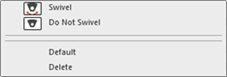
- 3
- Select the desired function e.g.
 不摆动.
不摆动.
| Function | Target |
|---|---|---|
| 摆动 | Allow swiveling to the left or right |
| 不摆动 | Do not allow swiveling. |
| 默认 | Enter the default setting into the control column |
| 删除 | Delete the entry from the control column
|

 : In a special case entries from knitting elements also can be entered.
- 4
- Draw-in in the desired pattern rows.
- In the pattern rows with the entry all the used Intarsia yarn carriers are not swiveled.
II. Influence the Intarsia binding for an entire pattern row:
- 设计花型 appears.
- The
 嵌花锁定 control column is displayed.
- 1
- Position the cursor on the control column.
- 2
- Open the context menu with the RMB.
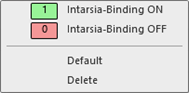
- 3
- Select the desired function e.g. 关闭嵌花锁定.
| Function | Target |
|---|---|---|
1 | 开 | Allow Intarsia Binding
|
2 | 关 | Prevent the Intarsia Binding |
| 默认 | Enter the default setting into the control column |
| 删除 | Delete the entry from the control column
|
 : The type of binding is determined in the
 - 4
- Draw-in in the desired pattern rows.
- No Intarsia Binding will be entered into any color of the pattern rows with the entry 关闭嵌花锁定.
III. Influence knitting-out for an entire pattern row:
- The 设计花型 is displayed.
- The
 编织带出 control column is displayed.
- 1
- Position the cursor on the control column.
- 2
- Open the context menu with the RMB.
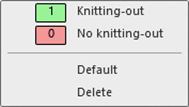
- 3
- Select the desired function e.g. 无编织带出.
|
| Function |
|---|---|---|
1 | 编织带出 | Allow knitting-out the yarn carriers. |
2 | 无编织带出 | Prevent knitting-out the yarn carriers. |
| 默认 | Enter the default setting into the control column |
| 删除 | Delete the entry from the control column
|
- 4
- Draw-in in the desired pattern row.
- In these marked pattern rows the yarn carriers will not be knitted-out.