New lined shape project (dialog box)
The  新建线模型项目 dialog box can be called up as follows:
In the Start window:
In the tab 文件:
In the quick access toolbar of the lined shape project:
 Within a lined shape project, you can create, load and manage several lined shapes.
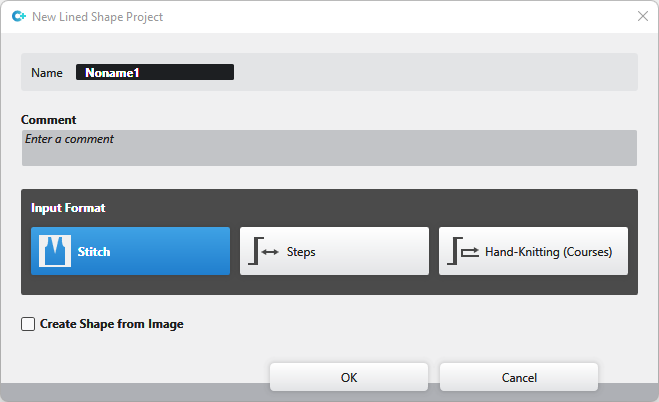
|
名称 |
Enter name of the lined shape project |
|
注释 |
Enter a comment to the lined shape project |
Select the 输入格式:
|
|
You enter the line by 线圈. |
|
|
You enter the line by 步. |
|
|
You enter the line by courses as for hand knitting. |


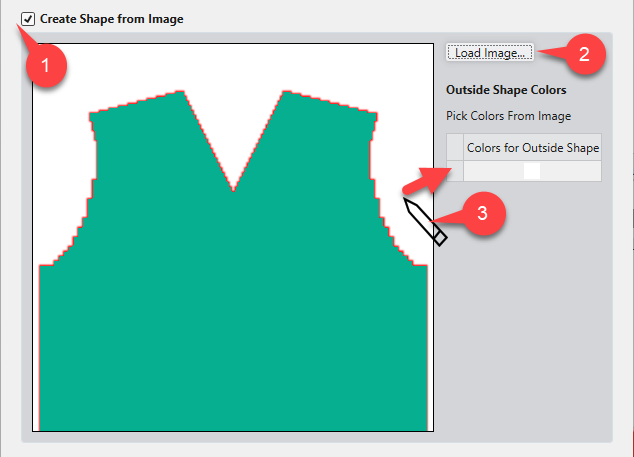
|
|
Create a lined shape from an existing image file.
|
|
加载图片... (2) |
导入图片文件作为模板 |
|
Outside Shape Colors (3) |
Click the desired color of the image with the cursor.
|

 Within a lined shape project you can manage several lined shapes together in the 线圈 and 步 input format.
Lined shapes in the 手摇机编织(转) input format cannot be managed together with lined shapes in the 线圈 or 步 input format in the same lined shape project.
You can find examples to create lined shapes here:
- Fully Fashion-Pattern: Front with V-neck and Structure
- Fully Fashion-Pattern: Front with neckline and shoulder gore by types of shape elements
- Fully Fashion-Pattern: Front with V-neck and Knitting Ranges
- Fully Fashion-Pattern: Front with V-neck and dart type of shape element
- Fully Fashion-Pattern: Front with V-neck and Binding-off
- Fully Fashion-Pattern: Fabric Piece with Multi-step Widening and Multi-step Narrowing
- Fully Fashion-Pattern: Back with French Shoulder
- Working with Shapes