Positioning the Shape Element in Basic Shape
The shape elements neckline, gore, hole, etc. can be arranged in the basic shape shape element:
-
 置于顶层
置于顶层 -
 置于底层
置于底层 -
 上移一层
上移一层 -
 下移一层
下移一层
Allocating the shape elements within the basic shape:
- Several shape elements are created e.g. neckline and a gore
- Shape elements are positioned partially or completely overlapping
- 1
- Select the shape element that is to be arranged.
- Display of the selected shape element in the
 document window in the table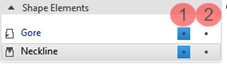
- 2
- Select the desired function in the 排列对象 group.
- or -
Call up the context menu and select the desired function 重新安排.
- The selected object is positioned according to the selection.
Display of the created shape elements in the basic shape
|
| ||
1 |
| Shape Element visible |
| Shape Element invisible | |
2 |
| Shape element can be moved! |
| Shape element cannot be moved! | |


