Quick Access Toolbar
In the quick access toolbar you have access at any time to the following commands:
 The quick access toolbar can be found at the left border of the title bar.

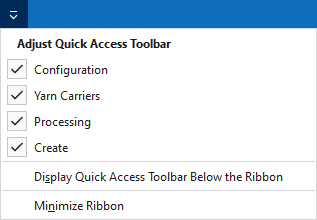
Using the drop-down menu you can display and hide some commands in the quick access toolbar.
Make settings for the presentation of the ribbon.
The following commands are always active in the quick access toolbar and cannot be hidden:
|
|
创建一个新花型项目(*.spf)。 |
|
|
打开文件(花型,编织元素,模型) |
|
|
保存 |
|
|
撤销之前操作。 |
|
|
重复之前操作。 |
|
|
对编织管理器中的编织元素,例如,模块,颜色排列,模块排列和花型元素进行管理。 |


调节快速访问工具栏
The following commands can be displayed and hidden in the quick access toolbar:
|
|
显示配置对话框。 |
|
|
打开当前订单(顺序)的所有花型的导纱器视图。在这里查看和编辑导纱器分配以及颜色参数。 |
|
|
开始当前花型的工艺处理。 |
|
|
工艺处理之后生成当前花型的编织程序 (sin, set, and jac)。 |


Make settings for the quick access toolbar and the ribbon:
|
在功能区下方显示快速访问工具栏 |
Display the quick access toolbar under or above the ribbon. |
|
功能区最小化 |
Show or hide the ribbon. |