Creating and Editing a Colored Yarn
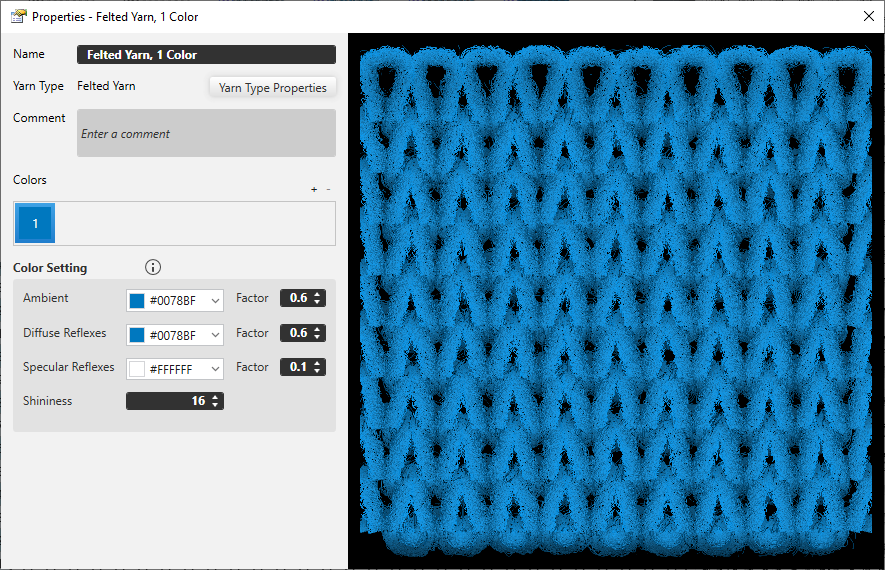
Without a yarn type as basis, it is not possible to create a yarn with color.
Therefore each yarn with color is based on a yarn type and is automatically linked to a specific yarn type.
If a yarn with color is selected, the corresponding yarn type is displayed in brackets.
 Do not delete linked yarn type!
Yarn properties of the yarn with color could be lost.
Optional information of the yarn with color
- 名称
- 注释
Essential color settings:
- 颜色
- You can add colors by clicking the plus icon.
- You can delete colors by clicking the minus icon.
- The quantity of addable colors are defined by the quantity of individual threads of the yarn properties.
-
氛围
The environment color defines the essential coloring of the yarn.
Define the color values in the drop-down list box: - The factor 0.1 indicates a pale representation of the defined color
- The factor 4.0 indicates an intensely illuminated representation
-
漫反射
The diffuse reflection refers to the reflection of colors to achieve a more realistic representation of colors. - The intensity can be modified by the factors from 0.1 to 4.0.
- The factor 0.1 indicates reduced reflection of the defined color.
- The factor 4.0 indicates an intensive reflection
-
镜面反射
The setting of the mirror reflection defines the reflected color of a yarn and its intensity by an individual factor of 0.1 to 4.0 - The factor 0.1 indicates a reduced mirror reflection of the defined color
- The factor 4.0 indicates an intensive reflection.
-
光泽度
The shininess controls the brightness of the colored yarn.
The factor covers from 0 to 128. - 0 stands for intense brightness
- 128 stands for low brightness
- The shininess appears in the defined color of the setting 镜面反射.